关于这个 mod
跟踪拉取请求的合并、审查与检查状态,并提示变更。
此作品由社区作者维护,具体功能、版本要求与配置方法请查看下方原始 README。本站提供权限扫描结果;安装前请检查源码及外部依赖。
跟踪拉取请求的合并、审查与检查状态,并提示变更。
跟踪拉取请求的合并、审查与检查状态,并提示变更。
此作品由社区作者维护,具体功能、版本要求与配置方法请查看下方原始 README。本站提供权限扫描结果;安装前请检查源码及外部依赖。
请先查看作者 README 确认 marketplace 和插件名称;命令可能随仓库结构改变。
claude plugin marketplace add sezaakgun/cc-pr-tracker
claude plugin install cc-pr-tracker
Watch GitHub pull requests without leaving your Claude Code session.
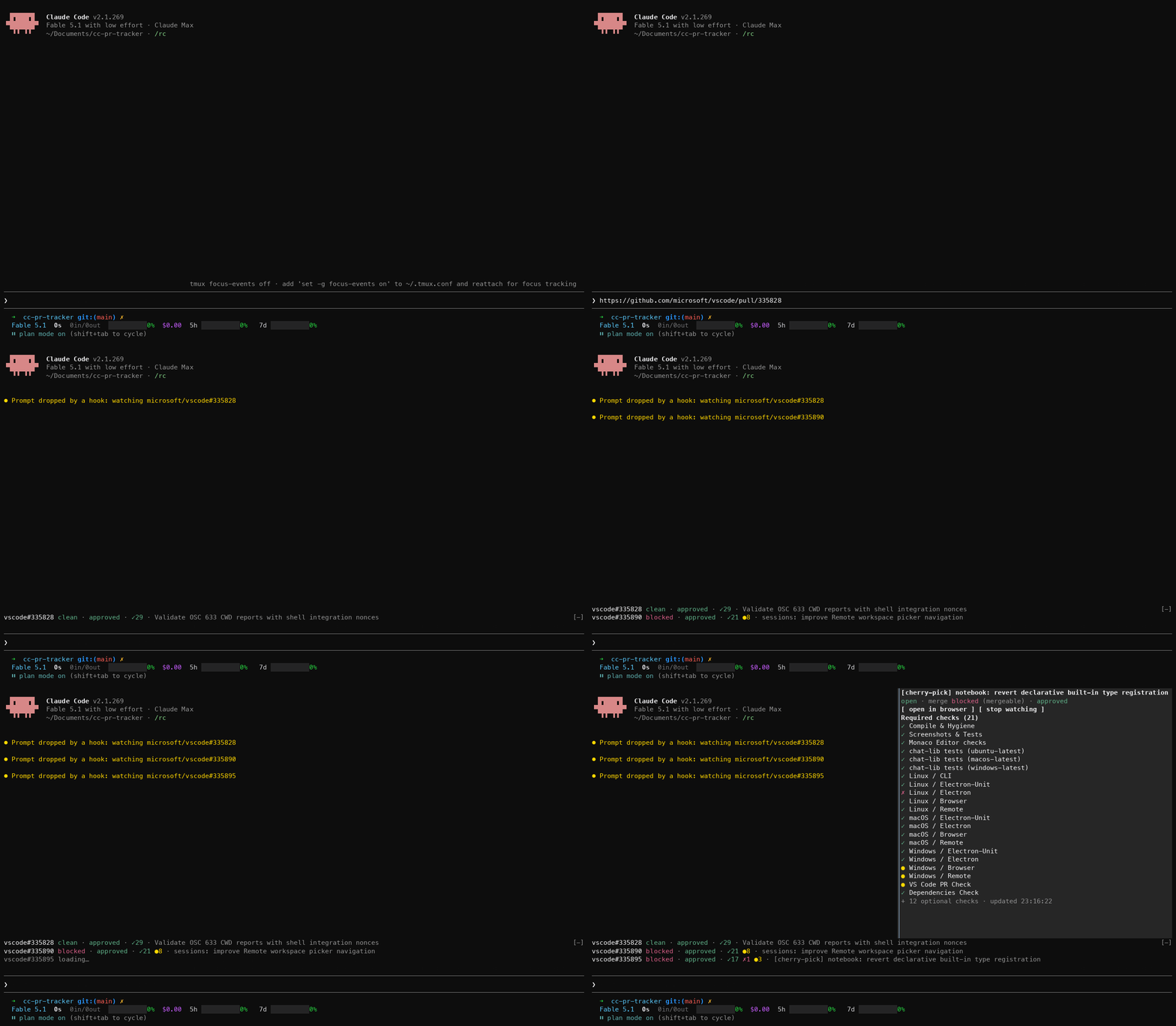
Paste a PR URL, or let Claude open one, and it gets one line above the prompt: merge state, review decision and required checks, refreshed every minute. When a check flips or the merge state moves you get a toast, a one-second flash and a sound. You keep working; the PR tells you when it needs you.


One PR is always one line; the details panel names the checks. Reading the line explains each part.
The plugin is built on Claude Code function hooks: TypeScript that runs inside Claude Code's own process, instead of shell-command hooks. They are in early access, behind an environment variable that the quick start sets.
CLAUDE_CODE_ENABLE_FUNCTION_HOOKS=1 set. The quick start shows where.gh), logged in with access to the repos you watch. Check with gh auth status.afplay with the system sounds) and open. On Linux, xdg-open is tried when open is absent, and there is no sound.Turn function hooks on. Add this to ~/.claude/settings.json (create the file if it does not exist, or merge the env key into what is there). Without it the plugin installs fine but does nothing.
{
  "env": {
    "CLAUDE_CODE_ENABLE_FUNCTION_HOOKS": "1"
  }
}
This also loads the hooks module of any other installed plugin that ships one. For a single session instead, prefix the command: CLAUDE_CODE_ENABLE_FUNCTION_HOOKS=1 claude.
Install from GitHub. The repo is its own marketplace:
claude plugin marketplace add sezaakgun/cc-pr-tracker
claude plugin install cc-pr-tracker@cc-pr-tracker
Start claude, paste a PR URL as the whole prompt and press Enter. No model turn runs; Claude Code shows Prompt dropped by a hook: watching owner/repo#N. Several URLs at once, separated by spaces or newlines, are all watched.

The line appears above the prompt and fills in within a few seconds.
Paste the same URL again to stop watching.
If the line shows gh failed: … instead, see Troubleshooting.
To try it without installing, or to hack on it, clone and load it for one session:
git clone https://github.com/sezaakgun/cc-pr-tracker
cd cc-pr-tracker
claude --plugin-dir .
The repo's own .claude/settings.json sets the variable, so sessions started inside the folder need no prefix.
Watch a PR: paste its URL as the whole prompt, several at once if you like. Or mention URLs in a normal prompt: the prompt runs as usual and the PRs are watched too.
Watch a PR Claude creates or talks about: nothing to do. Any open PR whose URL appears in Claude's answer is watched, and so is the URL gh pr create prints when it runs through the Bash tool. Subagent answers are not scanned.
Open a PR: Cmd+click its repo#number (needs a terminal that renders hyperlinks), or hover the line and press open.
See every check: hover the line and press details. A side panel lists every required check and every failing optional one, linked to its run when the run has an https link.

Silence a PR: hover the line and press mute. The line keeps updating but that PR no longer toasts, flashes or plays a sound; the line ends in · muted. Press unmute to turn alerts back on.
Silence every PR: open /config and turn on Mute all PR alerts. It applies at once, is saved across sessions, and every line ends in · muted while it is on. Turn it off to get alerts back; PRs you muted one by one stay muted.
Stop watching: hover the line and press ×, or paste the same URL again as the whole prompt. A paste of several URLs toggles each one; a URL inside a normal prompt never stops anything.
Several PRs stack, one line each, in the order you added them.
repo#number, then draft, merged or closed when the PR is not simply open. A merged or closed PR keeps its line until you stop it.clean, has_hooks) means mergeable now. Yellow (behind, unstable) means update the branch or an optional check failed. Red (blocked, dirty) means a required check or review is missing, or there are conflicts. Gray (draft, unknown) needs no action; unknown usually resolves on the next poll.approved in green, changes requested in red, review required in yellow, or no review in gray when the repo has no review rules.✓N passed, ✗N failed or cancelled, ●N pending. Skipped checks are not counted and show as ○ only in the details panel. Failing optional checks are summarised as (+N optional ✗) and listed there too.· refresh failed in red at the end means the last poll errored and the line shows the previous values.Every poll is compared with the previous one. A required check changing bucket (for example pending → fail, or a new check appearing) or the merge state moving (for example blocked → clean) triggers:
my-service#42 lint: pending → fail● PR checks changedTwo things never alert: the first load of a PR, and a move into or out of GitHub's temporary unknown merge state.
CLAUDE_CODE_ENABLE_FUNCTION_HOOKS is set in ~/.claude/settings.json under env (see Quick start), and that the plugin is loaded with /plugins.gh failed: … on the line. Run gh pr view <url> in a terminal. Usually gh is not logged in or has no access to that repo.Required checks: none reported in details. The repo has no branch protection with required checks. The line still shows the merge state and review./System/Library/Sounds present plays sounds.open.gh, one GraphQL call per PR per poll.claude -p run never draws. Only interactive terminal sessions show the UI.gh pr create output.github.com URLs are recognised; GitHub Enterprise hosts are not.refresh failed and the next one retries.The plugin is one hooks module, hooks/register.tsx. It hooks five events:
prompt.submit reads PR URLs from your prompt and starts or stops watching.turn.complete reads PR URLs from Claude's final answer, and tool.call on Bash reads the URL gh pr create prints.ui.render on AbovePrompt draws the lines; on Pane it draws the details panel.session.start sets up a 60-second timer that polls every watched PR.Each poll is one read-only GraphQL call through gh api graphql: the PR's title, state, merge state and review decision, plus every check on its head commit with GitHub's own isRequired flag. The plugin maps check states to the same pass / fail / pending / cancel / skipping buckets that gh pr checks uses. A failed poll keeps the previous values and marks the line refresh failed, so a network blip is not reported as a change. Every call has a 30-second timeout.
bun test                              # unit tests for the pure helpers
claude plugin validate .claude-plugin/plugin.json   # lists the hooked events and $ calls
claude plugin validate .                            # checks the marketplace manifest
For type checking, run the built-in /plugin-types command inside this folder in a Claude Code session. It writes .claude/types/, which is git-ignored; tsc fails with a missing claude-code module until it exists. Then:
bunx -p typescript tsc -p .
Edits hot-reload into a running session. If a reload fails partway, the transcript says so; restart the session.
MIT. See LICENSE.

在会话内辅助查看与审查代码差异。


通过 WebSocket 桥接实时观察新拉取请求的 CI 状态。

nibbl:Nibbl: a tiny pixel pet above your prompt that nibbles your bugs